SaabOpenTech - Freeware Saab maintenance terminal
Preface
Standard OBD-II readers are great for diagnosing problems in modern cars. However, much more detailed information about the car can be retrieved using a special maintenance terminal, that's only available for Saab dealers. Ordinary people can purchase these terminals, named Tech2, but you still need the correct Saab Tech2 software and about 3000 euros. Here's an option - get a CAN-to-USB adapter (about 200 eur) and Windows software from me (free of charge). Of course I only have a small percentage of the Tech2 features, but the software will evolve and get more features. It's a command-line utility now, next it will be a Windows GUI application and before you know it, it will have support for ordinary OBD-II readers. You'll just have to wait, or give a helping hand to get things quicker.
Application
Introduction
SaabOpenTech is currently a command-line utility. You will have to run it from the Windows Command Prompt. Running the executable without any parameters will show available options. For example if you want to execute the SID display test, you should give 't' as a parameter.
SaabOpenTech tOther commands may take a second parameter, which will be the setting value. For example if you want to turn off the seat belt warning beep, you should type:
SaabOpenTech s 0The first parameter, 's', indicates the command (set seat belt warning beep), and the second parameter '0', zero, means that you want to turn the feature off. If you would have typed the command without the second parameter, SaabOpenTech would just show the current value of the setting.
Current features
- Read measurement values from Trionic 7 (knock and misfire counters)
- Read system information (text strings) from control units
- Activate SID display test
- Set Seat belt warning beep (on / off)
- Set Test brake lights announcement (on / off)
- Set Trunk locking delay (off, immediate, 1...254 sec)
- Set Trunk re-locking delay (off, immediate, 1...254 sec)
- Set Trunk speed locking (off, 2, 4,..., 12, 14 km/h)
- Set Double door unlocking with remote (on / off)
Requirements
- Saab 9-3 or 9-5
- Microsoft Windows (tested on XP)
- Lawicel CANUSB adapter
- A connector adapter to get CANUSB connected to the Saab I-Bus
Download
The application is freeware and has source code included. If you want to use my source code as a starting point for your own application, go right ahead (even commercial usage is allowed). You can download the application here:
This is a beta release with very little testing done - Use at your own risk!
Test reports
SaabOpenTech has been tested on the following car models.
- 9-3 2.0t 1999, Trionic 5, Manual
- 9-5 2.0t 2000, Trionic 7, Manual
- 9-3 2.0t 2001, Trionic 7, Manual
Screenshots
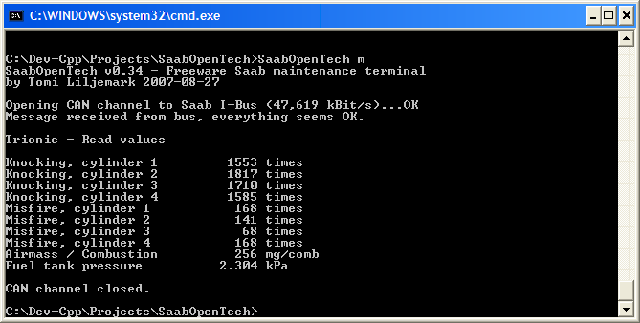 Figure 1. Screenshot of
SaabOpenTech viewing Trionic 7 values.
Figure 1. Screenshot of
SaabOpenTech viewing Trionic 7 values.